개인정보 취급 및 처리방침
'(주)디에스앤지시스템'은 (이하 "회사"는) 이용자의 개인정보를 중요시하며, "정보통신망 이용촉진 및 정보보호 등에 관한 법률", "개인정보보호법"등 관련 법령에 의거하여 개인정보 취급 및 처리방침을 재정하고 이를 준수하고 있습니다. 회사는 개인정보 취급 및 처리방침을 통하여 이용자가 제공하는 개인정보가 어떠한 용도와 방식으로 이용되고 있으며, 개인정보보호를 위해 어떠한 조치가 취해지고 있는지 알려드립니다. 또한 개인정보를 보호하고 이와 관련한 고충을 신속하고 원활하게  처리할 수 있도록 합니다.
                  본 개인정보 취급 및 처리방침은 관련 법령, 정부의 정책변경 및 회사 내부 운영방침의 수정에 따라 변경될 수 있습니다. 회사는 개인정보 취급 및 처리방침을 개정하는 경우 회사 홈페이지 공지사항(또는 개별공지)을 통하여 고지하겠습니다. 이용자께서는 홈페이지 방문 시 이를 수시로 확인해 주시기 바랍니다.

                  ※ 본 방침은 : 2015년 11월 01일 부터 시행됩니다.


                  1. 개인정보 수집 항목
                  (주)디에스앤지시스템은 적법하고 공정한 수단에 의하여 최소한의 개인정보만을 수집하고 있으며, 수집하는 개인정보 항목은 아래와 같습니다.

                  <견적문의>
                  - 성명, 소속명, 전화번호, 이메일

                  <기술문의>
                  - 성명, 소속명, 전화번호, 이메일

                  <전화상담요청>
                  - 성명, 소속명, 전화번호

                  <세미나 참가 및 기타 이벤트 신청>
                  - 성명, 소속명, 전화번호, 소속 전화번호, 이메일, 직급 (추가정보 수집 시 별도 동의에 의해 수집)

                  <서비스 이용 시 자동수집>
                  - IP Address, 쿠키, 방문 일시, 서비스 이용 기록, 불량 이용 기록


                  2. 개인정보 수집방법

                  ① (주)디에스앤지시스템은 적법하고 공정한 동의절차를 통하여 아래와 같이 개인정보를 수집하고 있습니다.
                  가. 회사 홈페이지(모바일, WEB), 이메일, 블로그 등을 통한 정보 수집

                  ② (주)디에스앤지시스템은 이용자가 회사의 개인정보 수집이용 동의서의 내용에 대해 "동의" 또는 "동의하지 않음"을 선택할 수 있는 절차를 마련하고 있습니다.


                  3. 개인정보의 수집 및 이용목적
                  (주)디에스앤지시스템은 필요한 최소한의 범위 내에서 다음 각 호의 목적으로 개인정보를 수집 및 이용하고 있습니다. 그 밖에 인권 및 사생활 침해가 우려되는 개인정보는 일체 수집하지 않습니다.

                  ① 홈페이지 운영 및 관리 : 각종 상담 및 문의에 대한 통지, 내용확인, 고충처리, 마케팅 및 광고 등 원활한 의사소통을 목적으로 개인정보를 처리합니다.
                  ② 기타 : 행사·이벤트 진행 및 경품 배송 등을 목적으로 개인정보를 처리합니다.


                  4. 개인정보의 보유 및 이용기간
                  (주)디에스앤지시스템은 원칙적으로 개인정보 수집 및 이용 목적이 달성된 때에는 해당 이용자의 개인정보를 지체 없이 파기합니다.
                  단, 상법 등 관련 법령의 규정 및 회사 내부장침에 의해 보존할 필요가 있는 경우 회사는 일정 기간 동안 해당 이용자의 개인정보를 아래와 같이 보관합니다.

                  ① 행사 및 이벤트 정보 : 이벤트 종료 후 6개월

                  ② 재화 또는 서비스 제공 : 재화, 서비스 공급완료 및 요금결재, 정산 시 까지 단, 계약, 대금결제, 재화 등의 공급기록(5년) 등 법령에서 보유를 정한 정보의 경우 해당 기간까지

                  ③ 관련법령에 의한 정보보유 사유
                  가. 계약 또는 청약철회 등에 관한 기록 : 5년 (전자상거래 등에서의 소비자보호에 관한 법률)
                  나. 대금결제 및 재화 등의 공급에 관한 기록 : 5년 (전자상거래 등에서의 소비자보호에 관한 법률)
                  다. 소비자의 불만 또는 분쟁처리에 관한 기록 : 3년 (전자상거래 등에서의 소비자보호에 관한 법률)


                  5. 개인정보의 파기절차 및 방법
                  (주)디에스앤지시스템은 원칙적으로 개인정보 수집 및 이용 목적이 달성된 후에는 이용자의 개인정보를 다음과 같은 방법으로 지체 없이 파기합니다.

                  ① 파기절차 :
                  이용자가 입력한 개인정보는 목적이 달성된 후 별도의 DB로 옮겨져 (종이의 경우 별도의 서류) 내부 방침 및 기타 관련 법령에 의한 정보보호 사유에 따라 일정 기간 보관하거나 즉시 파기됩니다.
                  동 개인정보는 법률에 의한 경우가 아니고서는 보유되는 것 이외의 다른 목적으로 이용되지 않습니다.

                  ② 파기방법 :
                  종이에 출력된 개인정보는 분쇄기로 분쇄하거나 소각을 통하여 파기합니다. 전자적 파일형태로 저장된 개인정보는 기록을 재생할 수 없는 기술적 방법을 사용하여 삭제합니다.


                  6. 개인정보의 취급위탁

                  ① (주)디에스앤지시스템은 서비스 향상을 위해서 이용자의 개인정보를 필요한 경우 동의 등 법률상의 요건을 구비하여 외부에 수집·취급·관리 등을 위탁하여 처리할 수 있습니다.

                  ② 위탁업무, 수탁자, 위탁하는 업무의 내용 등에 관한 사항을 서면, 전자우편, 전화 또는 홈페이지를 통해 게시합니다.

                  ③ 회사는 관계 법령에 따라 위탁계약 시 개인정보가 안전하게 관리될 수 있도록 필요한 사항을 규정하고 있습니다. 또한 공유하는 정보는 당해 목적을 달성하기 위하여 필요한 최소한의 정보에 국한됩니다.


                  7. 제 3자에 대한 제공 및 공유

                  ① (주)디에스앤지시스템은 이용자의 동의가 있거나 관련 법령의 규정에 의한 경우를 제외하고는 이용자들의 개인정보를 "3. 개인정보의 수집 및 이용목적"에서 고지한 범위 내에서 사용하며, 이용자의 사전 동의 없이는 동 범위를 초과하여 이용하거나 원칙적으로 이용자의 개인정보를 외부에 공개하지 않습니다.

                  ② 다만, 아래의 경우에는 예외로 합니다.
                  가. 개인정보의 제3자 제공을 이용자가 사전에 동의한 경우

                  ③ 다음의 경우에는 관련 법령의 규정에 의하여 이용자의 동의 없이 개인정보를 제공할 수 있습니다.
                  가. 수사상의 목적으로 법령에 정해진 정차와 방법에 따라 수사기관으로부터의 요구가 있는 경우
                  나. 통계작성, 학술연구, 시장조사를 위하여 특정 개인을 식별할 수 없는 형태로 광고주, 협력사나 연구단체 등에 제공하는 경우
                  다. 회사는 이용자의 동의 없이 관계법령에 의하거나 수사기관의 요청에 의해 정보를 제공한 경우에도 이를 당사자에게 고지하는 것을 원칙으로 운영하고 있습니다. 그러나, 법률상의 근거에 의해 부득이하게 고지를 하지 못할 수도 있습니다. 화사는 본래의 수집목적 및 이용목적에 빈하여 무분별하게 정보가 제공되지 않도록 최대한 노력하겠습니다.

                  ④ 그 밖에 개인정보 제3자 제공이 필요한 경우에는 합당한 절차를 통한 이용자의 동의를 얻어 제3자에게 개인정보를 제공할 수 있습니다.


                  8. 정보주체의 권리·의무 및 그 행사방법
                  이용자는 개인정보주체로서 언제든지 등록되어 있는 이용자의 개인정보를 열람하거나 정정·삭제, 처리정지, 동의철회를 요청할 수 있습니다.
                  개인정보 열람, 정정·삭제, 처리정지, 동의철회를 하고자 할 경우 대표전화(02-6309-1830) 또는 개인정보보호책임자 및 담당자에게 서면(개인정보보호법 시행규칙 별지 제8호 서식), 전화, 이메일로 연락하시면 지체 없이 조치하겠습니다.

                  ① 이용자가 개인정보의 오류에 대한 정정을 요청한 경우, 회사는 정정을 완료하기 전까지 해당 개인정보를 이용 또는 제공하지 않습니다. 또한 오류가 있는 개인정보를 제 3자에게 이미 제공한 경우에는 정정 처리결과를 제3자에게 지체 없이 통지하여 정정이 이루어지도록 조치하겠습니다.

                  ② 회사는 이용자에 의해 삭제 요청된 개인정보를 이 방침과 관계 법령에 명시된 바에 따라 처리하고, 그 외의 용도로 열람 또는 이용할 수 없도록 처리하고 있습니다.

                  ③ 회사는 개인정보의 분실, 도난, 누출이 확인될 시 명의 도용, 스팸, 전화사기 등 개인정보 누출로 인한 2차 피해 확산을 방지하기 위해 이용자에게 해당사실을 통지하고 주무부처인 행정자치부 및 한국인터넷진흥원에 신고합니다.
                  가. 통지 및 신고 항목 : 누출정보, 누출시점, 이용자 조치 방법, 회사 조치 방법, 이용자 상담처
                  나. 통지 및 신고 방법
                  - 통지방법 : 전자 우편 (단, 상기 통지 수단에 대한 정보가 부재, 오류인 경우 홈페이지 공지사항으로 대신합니다.)
                  - 신고방법 : 한국인터넷진흥원 권장에 따라 신속한 접속 및 처리를 위해 인터넷 웹사이트에 신고합니다.
                  다. 누출된 개인정보 항목과 시점을 구체적으로 알 수 없는 경우, 당시까지 확인된 사항을 통지 및 신고하고 추가로 확인되는 사항은 확인되는 즉시 추가로 통지 및 신고할 수 있습니다.

                  ④ 이용자는 개인정보를 최신의 상태로 정확하게 입력하여 불의의 사고를 예방해 주시기 바랍니다. 이용자가 입력한 부정확한 정보로 인해 발생하는 사고의 책임은 이용자 자신에게 있으며 타인 정보의 도용 등 허위정보를 입력할 경우 이용자격이 상실될 수 있습니다.

                  ⑤ 이용자는 개인정보를 보호받을 권리와 함께 스스로를 보호하고 타인의 정보를 침해하지 않을 의무도 가지고 있습니다. 만약 이 같은 책임을 다하지 못하고 타인의 정보 및 존섬성을 훼손할 시에는 『정보통신망이용촉진및정보보호등에관한법률』등에 의해 처벌받을 수 있습니다.

                  ※ 이용자 개인정보 도용 시 대처 방법 안내 회사는 이용자가 타인의 개인정보를 도용하여 이용하였음을 알게 된 때 지체 없이 서비스 이용정지 등 필요한 조치를 취합니다. 또 자신의 개인정보 도용을 인지한 이용자가 서비스 이용정지 등을 요구하는 경우에도 업체는 즉시 조치를 취합니다.


                  9. 쿠키의 운영 및 활용

                  ① (주)디에스앤지시스템은 홈페이지 이용자에게 보다 나은 서비스를 제공하기 위하여 '쿠키(cookie)'를 사용합니다. 쿠키는 웹사이트를 운영하는데 이용되는 서버가 이용자의 PC에 보내는 아주 작은 텍스트 파일로서 이용자의 PC에 저장됩니다.

                  ② 회사는 원칙적으로 쿠키를 이용하여 이용자의 개인정보를 수집하지 않습니다. 다만, 이용자의 홈페이지 접속빈도, 방문시간, 이용자 규모 등을 파악하여 홈페이지 개선 및 보완을 위한 척도로 활용합니다.

                  ③ 이용자께서는 쿠키 설치에 대한 선택권을 가지고 있습니다. 따라서 이용자는 웹 브라우조에서 옵션을 설정함으로써 모든 쿠키를 허용하거나, 쿠키가 저장될 때마다 확인을 거치거나, 아니면 모든 쿠키의 저장을 거부할 수도 있습니다.
                  다만, 쿠키의 저장을 거부할 경우에는 일부 서비스 이용에 어려움이 발생할 수 있습니다.

                  ※ 쿠키 설치 허용 여부를 지정하는 방법 (Internet Explorer의 경우)
                  01. [도구] 메뉴에서 [인터넷 옵션]을 선택
                  02. [개인정보]를 클릭
                  03. [고급]을 클릭
                  04. 쿠키 허용여부를 선택


                  10. 개인정보보호를 위한 기술 및 관리적 대책
                  (주)디에스앤지시스템은 이용자의 개인정보를 취급함에 있어 개인정보가 분실, 도난, 누출, 변조 또는 훼손되지 않도록 안전성 확보를 위하여 다음과 같은 기숧적, 관리적, 물리적 대책을 강구하고 있습니다.

                  ① 해킹이나 바이러스 등에 대비한 기술적 대책 회사는 최신 백신프로그램을 이용하여 이용자의 개인정보나 자료가 유·누출되거나 훼손되지 않도록 방지하고 있으며, 기타 시스템적으로 보안성을 확보하기 위한 가능한 모든 기술적 장치를 갖추려 노력하고 있습니다.

                  ② 개인정보에 대한 접근 제한 회사는 개인정보처리시스템에 대한 접근권한의 부여, 변경, 말소를 통하여 개인정보에 대한 접근통제를 위하여 필요한 조치를 하고 있으며, 침입차단시스템을 이용하여 외부로부터의 무단 접근을 통제하고 있습니다.

                  ③ 내부관리계획의 수립 및 시행 회사는 개인정보의 안전하고 체계적인 관리를 위하여 내부관리계획을 수립하여 시행하고 있습니다. 또한 개인정보보호를 위해 내부관리규칙 및 관련 법령에서 정하는 개인정보보호규정을 성실히 이행하는지 주기적으로 자체 감사를 실시하고 있습니다.

                  ④ 개인정보 취급자의 최소화 및 교육 가. 회사는 개인정보를 취급하는 직원을 최소한의 인원으로 제한하고 해당 직원에 대한 정기적인 교육을 통해 이용자의 개인정보를 안전하게 관리할 수 있도록 하고 있습니다.
                  나. 개인정보 취급자의 업무 인수인계는 보안이 유지된 상태에서 철저하게 이루어지고 있으며, 입·퇴사 후 개인정보 유출 등 사고에 대한 책임을 명확히 하고 있습니다.

                  ⑤ 비인가자에 대한 출입통제 회사는 개인정보를 보관하고 있는 물리적 보관 장소를 별도로 두고 이에 대한 출입을 철저히 통제하고 있습니다.
                  그 외 회사는 이용자의 부주의나 인터넷상의 문제로 일어난 일에 대해서는 책임을 지지 않습니다. 이용자께서는 자신의 개인정보를 보호받을 권리와 함께 스스로를 보호하고 타인의 정보를 침해하지 않을 의무도 가지고 있습니다.


                  11. 링크사이트
                  회사는 이용자에게 다른 회사의 웹사이트 또는 자료에 대한 링크를 제공할 수있습니다. 이 경우 회사는 외부사이트 및 자료에 대한 아무런 통제권이 없으므로 그로부터 제공받는 서비스나 자료의 유용성에 대해 책임질 수 없으며 보증할 수 없습니다. 회사가 포함하고 있는 링크를 클릭하여 타 웹사이트의 페이지로 옮겨갈 경우 해당 웹사이트의 개인정보취급방침은 회사와 무관하므로 새로 방문한 사아티의 정책을 검토해 보시기 바랍니다.


                  12. 게시물

                  ① 회사는 이용자의 게시물을 소중하게 생각하며 변조, 훼손, 삭제되지 않도록 최선을 다하여 보호합니다. 그러나 다음의 경우는 그렇지 아니합니다. 가. 스팸(SPAM)성 게시물 (예 : 행운의 편지, 8억 메일, 특정사이트 광고 등) 나. 타인을 비방할 목적으로 허위 사실을 유포하여 타인의 명예를 훼손하는 글 다. 동의 없는 신상공개 회사의 저작권, 제 3자의 저작권 등 권리를 침해하는 내용, 기타 게시판 주제와 다른 내용의 게시물 라. 회사는 바람직한 게시판 문화를 활성화하기 위하여 동의 없는 타인의 신상 공개 시 특정 부분을 삭제하거나 기호 등으로 수정하여 게시할 수 있습니다. 마. 다른 주제의 게시판으로 이동 가능한 내용일 경우 해당 게시물에 이동 경로를 밝혀 오해가 없도록 하고 있습니다.
                  그 외의 경우 명시적 또는 개별적인 경고 후 삭제 조치할 수 있습니다.

                  ② 근본적으로 게시물에 관련된 제반 권리와 책임은 작성자 개인에게 있습니다. 또 게시물을 통해 자발적으로 공개된 정보는 보호받기 어려우므로 정보 공개 전에 심사숙고 하시기 바랍니다.


                  13. 만 14세 미만 아동의 개인정보보호

                  ① 만 14세 미만 아동의 경우, 회사는 사전에 법정대리인(부모님 등)의 동의를 구한 후에 만 14세 미만 아동의 개인정보를 수집하고 있습니다. 이러한 경우 법정대리인의 동의를 받기 위하여 필요한 최소한의 정보(성명, 연락처)를 법정대리인의 동의 없이 해당 아동으로부터 직접 수집할 수 있습니다.

                  ② 만 14세 미만 아동의 법정대리인은 아동으 개인정보의 열람, 정정, 동의 철회 등을 요구할 수 있으며, 이러한 요청이 있을 경우 회사는 법정대리인 확인 후 지체 없이 해당 조치를 취하도록 하겠습니다.
                  또한, 만 14세 미만 아동의 개인정보는 법정대리인의 동의 없이 제3자에게 제공하거나 공유하지 않습니다.


                  14. 광고성 정보의 전송
                  (주)디에스앤지시스템은 이용자의 명시적인 수신거부의사에 반하여 영리목적의 광고성 정보를 전송하지 않습니다. 회사는 행사·이벤트 응모 안내 등 온라인 마케팅을 위해 광고성 정보를 이메일, 문자 등으로 전송하는 경우 이용자가 쉽게 알아볼 수 있도록 다음과 같이 조치합니다.

                  ① 제목 : '(광고)' 문구를 제목란에 표시하지 않을 수 있으며, 본문란의 주요 내용을 표시합니다.

                  ② 본문 : 이용자가 수신거부의 의사표시를 할 수 있는 전송자의 명칭, 이메일 주소, 연락처를 기재하고, 수신거부의 의사를 쉽게 표시할 수 있는 방법을 명시합니다.


                  15. 개인정보보호 책임자 및 관리부서
                  (주)디에스앤지시스템은 이용자의 개인정보를 보호하고 개인정보와 관련한 불만사항 및 문의를 처리하기 위하여 다음과 같이 관련 부서 및 개인정보보호 책임자를 지정하고 있습니다.

                  [개인정보관리책임자/관리자] 성명 : 서지원 소속부서 : 온라인 사업부
                  전자우편 : dsng_support@dsngsystem.co.kr 전화번호 : 02-6309-1831 팩스번호 : 02-6309-1836

                  또한 이용자는 기타 개인정보 침해에 대한 민원이나 상담이 필요한 경우에는 아래 외부기관으로 문의하실 수 있습니다.

                  · 한국인터넷진흥원 (http://www.kisa.or.kr)
                  · 한국정보진흥원 (http://www.nia.or.kr)
                  · 개인정보침해신고센터 (http://privacy.kisa.or.kr)
                  · 대검찰청 인터넷범죄수사센터 (http://www.spo.gp.kr)
                  · 경찰청 사이버테러대응센터 (http://www.ctrc.go.kr)


                  16. 개인정보 취급 및 처리방침의 변경
                  (주)디에스앤지시스템은 관련 법령 및 ㅎ쇠사 정책에 의해 내용의 추가, 삭제, 정정이 있을 시 시행 7일 전부터 변경사항을 홈페이지를 통하여 고지할 것입니다.
                  본 개인정보 취급 및 처리방침은 시행일로부터 적용되며, 종전의 개인정보 취급 및 처리방침은 본 개인정보 취급 및 처리방침으로 대체됩니다.
                  시행일 : 2015-11-01
디에스앤지
고객의 미래가 디에스앤지의 미래입니다.
FAQ
IPMICFG 공장 초기화
작성자 : 관리자 작성일 : 2023.07.03 조회수 : 2346
환경에
맞게 아래 실행 파일 사용.
DOS:
/DOS/ IPMICFG.exe
UEFI:
/UEFI/ IPMICFG.efi
Linux:
32비트 -> /Linux/32bit/ IPMICFG-Linux.x86
64비트 -> /Linux/64bit/ IPMICFG-Linux.x86_64
Windows:
32비트 -> /Windows/32bit/ IPMICFG-Win.exe
64비트 -> /Windows/64bit/ IPMICFG-Win.exe
공장 초기화
진행
[ipmicfg_HOME] > IPMICFG.exe –fd

*To meet various needs, set [option] to 1, 2, or 3.
1: Preserves the configurations in the "Users" section.
2: Restores the factory defaults and the default password
of the motherboard.
3: Sets
user’s password to ADMIN.
< Example >

[ipmicfg_HOME] > IPMICFG.exe -fd 1
Reset to the factory default completed.
공장초기화 옵션
설명.
1 : "Users" 섹션의 설정을 보존함.
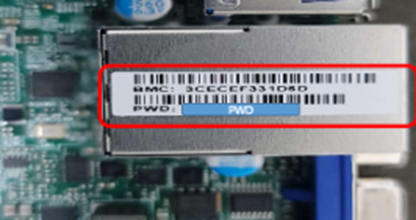
2 : M/B의 기본 패스워드로 변경함.
*기본 패스워드의 경우, M/B 표면의 스티커에 Password 표시 되어 있음.
3 : User’s 의 패스워드를 ADMIN으로 지정함.
| 이전 글 | IPMICFG 다운로드 |
|---|---|
| 다음 글 | 제품 QR코드 혹은 S/N 확인 방법. |